We have created a replica of our production environment on a VM (same OS, folder names, hardware specs, IIS settings, etc...) - tested pre upgrade (domains listed, admin accounts work, impersonation works).
When attempting to upgrade to latest from SM 16 (following articles provided by SM), we get:
"That domain was not found. Double check your email address"
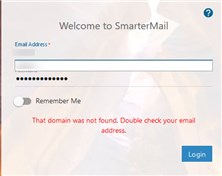
We then complete these steps (provided by SM support in 2021):
Stop the mail
service
Rename the
Mail.config.old.xml to mailconfig.xml
rename the settings
folder /service/settings
Start the mail
services back up
After this we can login but our 900+ domains are missing from SM and they would need to be manually re-attached.
The only way we found to fix this is by also replacing the domainlist.xml file with the one from the SM 16 install and restarting the service.
Smartermail: Is this the intended process for upgrade? If all these items are supposed to happen automatically what are we doing wrong?
We have disabled AV on the SM folders in case this was interfering - same result.
The event viewer application/system logs don't show any error pertaining to SM install.
Cannot find additional logs within SM directories pertaining to upgrade process.